Inside Compass: The AI That Fixes Your Task Overwhelm

You have 170 tasks. 45 are marked "Critical." You're paralyzed. You don't know where to start. This is the exact moment Compass was built for.
The Age-Old Problem: When Your Tasks Get Out of Hand
Every productivity system eventually faces the same crisis: task accumulation. You're diligent, you capture everything, but one day you wake up to:
- 45 critical tasks (when realistically you can handle 3)
- 70 tasks marked "Opportunity Now" (the healthy range is 5-15)
- No idea which tasks to tackle first
- Decision paralysis that wastes your most productive hours
Traditional task managers leave you here, staring at the list. Compass doesn't.
The Most Powerful Feature: Schedule-Aware Auto-Suggestions
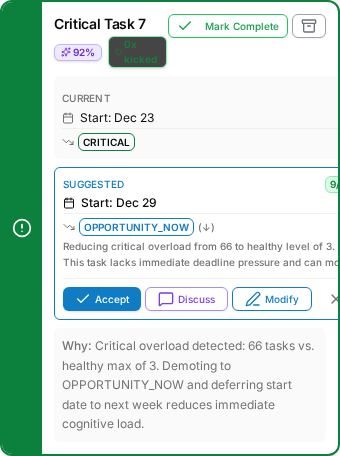
This is where Compass becomes genuinely revolutionary. Every morning at 4 AM, the AI analyzes:
- Your calendar: Where do you actually have focus time?
- Your task load: What's sustainable vs. overwhelming?
- Your schedule constraints: Is "Call customer support" scheduled for 2 AM?
- Your priority balance: Do you have 42 "critical" tasks creating decision paralysis?
Then it generates specific, actionable auto-suggestions to fix your system:
Real Examples of Auto-Suggestions
-
Reschedule to less busy days: "Move 'Prepare Q4 presentation' from tomorrow (8 meetings) to Thursday (2 hours of focus time available)"
-
Fix schedule mismatches: "Take family to zoo" scheduled "Anytime" → Suggest "Weekend Daytime"
-
Demote overwhelming priorities: "You have 42 critical tasks. Healthy max is 3. Demote 39 tasks to OVER_THE_HORIZON to restore clarity"
-
Assign to appropriate schedules: "Morning workout" with no schedule → Suggest "Weekday Mornings" AND "Weekend Mornings"
-
Archive stale tasks: "Task created 6 months ago, never started, no progress → Suggest archiving"
The AI doesn't just tell you your system is broken. It tells you exactly how to fix it.
Batch Operations: Fix Your Entire System in Seconds

Here's what makes this truly powerful: You don't have to accept suggestions one-by-one.
Compass offers two ways to handle corrections:
1. Summary View (The Fast Path)
- See all corrections in a scrollable panel
- One "Accept All" button applies every suggestion
- Fix 74 task adjustments in under 5 seconds
- Perfect when you trust the AI's analysis
2. Cards View (The Thoughtful Path)
- Review each correction individually
- See full reasoning, confidence scores, and impact
- Accept, modify, or reject each suggestion
- Perfect when you need more control
Both approaches support batch selection—check multiple corrections and apply them all at once. The AI does the heavy lifting; you make the final call.
How the AI Understands "Schedule-Aware"
The schedule-aware engine looks at each task and asks sophisticated questions:
Calendar Analysis
- "When does this person have focus time available?"
- "Which days have meeting overload?"
- "Are there calendar conflicts with this task's current date?"
Schedule Appropriateness
- "Is 'Dinner with spouse' scheduled for 9 AM?" → Suggest Evening
- "Is 'Morning workout' missing a schedule?" → Suggest Weekday + Weekend Mornings
- "Is 'Call insurance company' at 11 PM?" → Suggest Business Hours
Task Interaction Analysis
- "If I move Task A to Thursday, does that create overload?"
- "Should this habit skip today to protect the weekly streak?"
- "Does this priority change cascade to other tasks?"
The result: Suggestions that actually make sense in your real life.
Task Health Analysis: Your System at a Glance
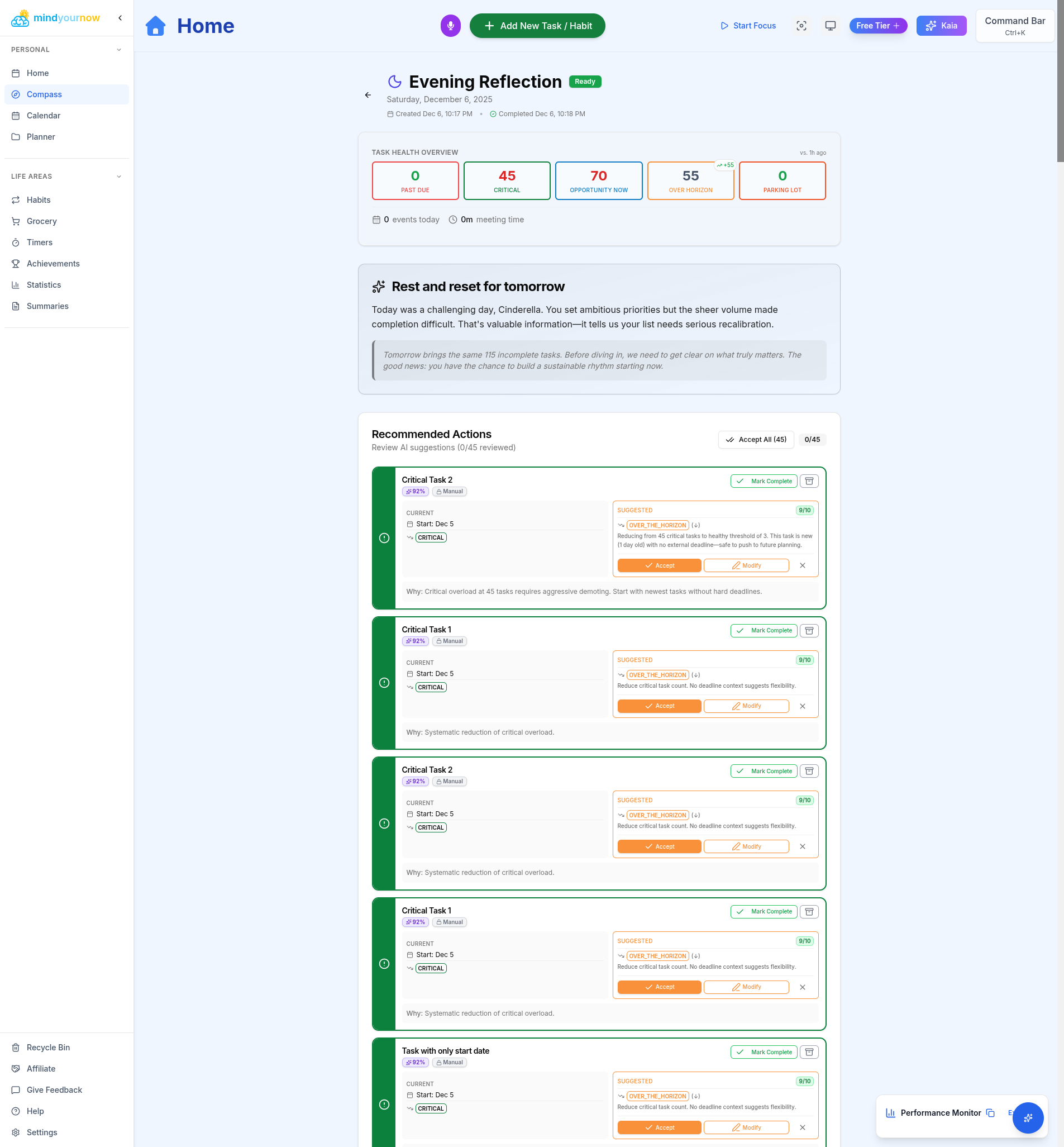
Kaia doesn't just count your tasks—she analyzes them against evidence-based thresholds for cognitive sustainability. The health dashboard shows you exactly where you stand:
🔴 Red Zone (Danger)
- Critical Tasks: 45 (healthy max: 3)
- Opportunity Now: 70 (healthy range: 5-15)
🟢 Green Zone (Healthy)
- Over the Horizon: 55 (no limit)
- Parking Lot: 0 (no limit)
- Past Due: 0 (target: 0)
When you exceed these thresholds, Kaia provides exactly enough corrections to bring you back to sustainable levels. In the example above, she recommends:
- 39 priority demotions (42 critical → target of 3)
- 55 task deferrals (70 opportunity now → target of 15)
- Result: 74 total corrections to restore your system to green
The Navigator's Report: Your Personalized Action Plan
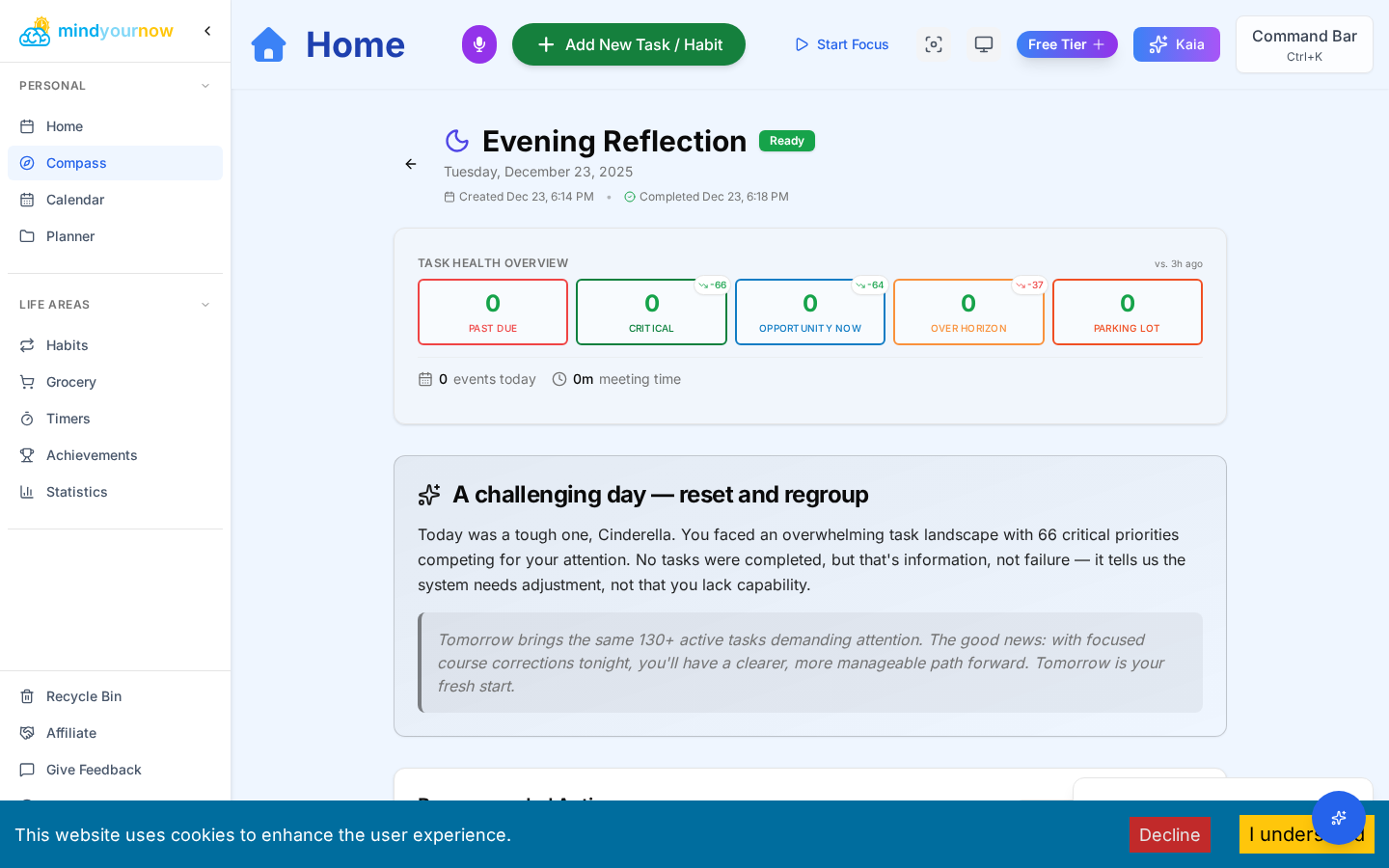
The Navigator's Report isn't a template—it's freshly generated AI analysis customized to your exact situation. This is where Kaia translates the data into actionable guidance:
What Makes It Powerful:
-
Acknowledges your reality: "You have 42 critical tasks (healthy max is 3). This creates severe cognitive overload."
-
Explains the impact: "With 170 total tasks and 45 marked critical, you're experiencing decision paralysis—every task feels urgent, so nothing gets done."
-
Gives you the fix: "Accept these 74 corrections to demote overwhelming priorities and reschedule tasks to less busy days. Your system will return to green health."
-
Considers your schedule: "You have 8 hours of focus time available today, but 42 critical tasks competing for attention. Let's reduce that to 3 actionable items."
-
Sets realistic expectations: "This won't happen overnight, but these corrections create immediate clarity."
This isn't generic advice. It's your situation analyzed, your schedule considered, and your path forward mapped out.
Trust, But Verify: AI Confidence Scores
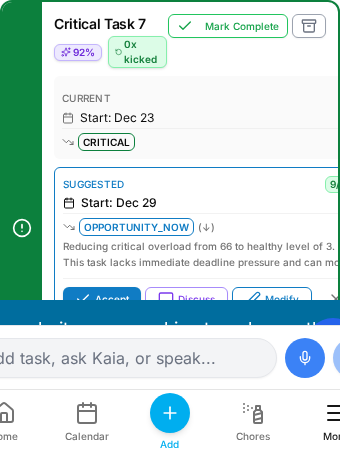
Each correction includes a confidence score (0-100%) so you know when to trust the AI's judgment:
- 90-100%: Clear recommendation—the AI sees strong signals in your data
- 70-89%: Solid suggestion—reasonable to accept, though your context matters
- 50-69%: Needs review—the AI sees patterns but recommends your judgment
You'll also see impact scores (1-10) showing how much each correction improves your system health. A 9/10 impact means this single change makes a significant difference.
These scores help you prioritize when time is limited—accept high-confidence, high-impact corrections first, review lower-confidence suggestions when you have more time.
You're Still the Captain: Accept, Modify, or Reject
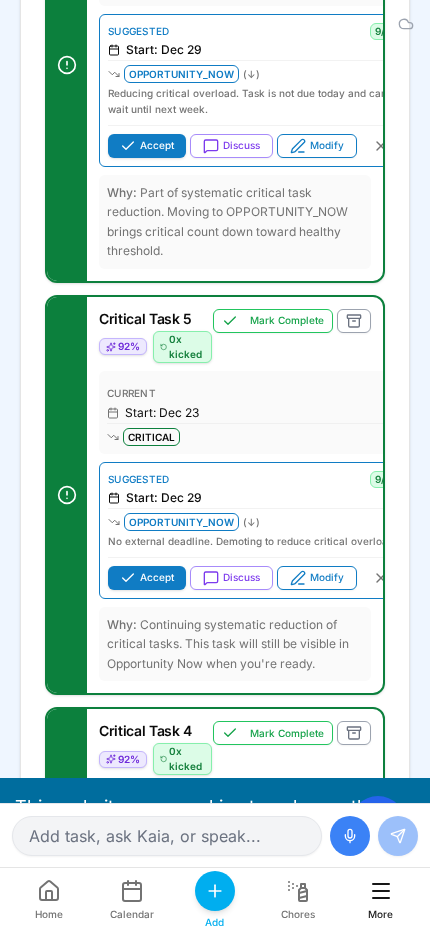
The AI provides recommendations, but you make the final call. Every correction offers three options:
- ✅ Accept: Apply the suggestion with one tap
- ✏️ Modify: Open the task to make your own adjustments
- ❌ Reject: Dismiss this correction—you know something the AI doesn't
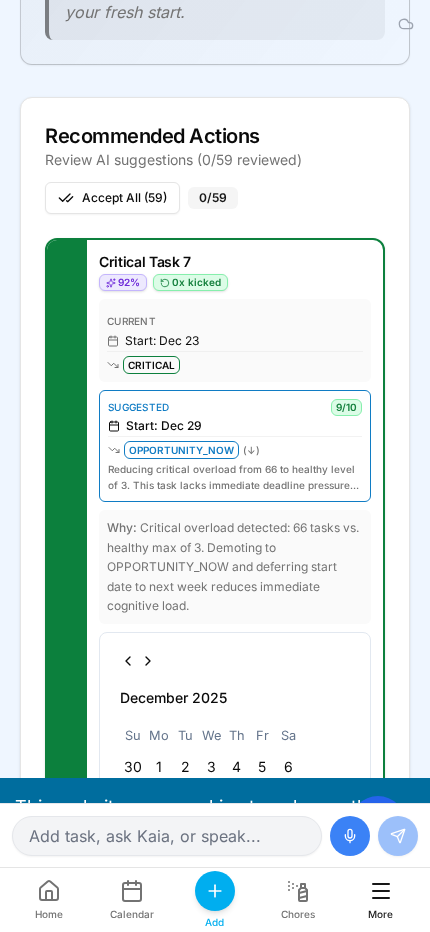
Undo functionality lets you reverse any decision if you change your mind. And batch operations mean you can accept 50 corrections in 5 seconds or take your time reviewing each one individually.
The power is in having both options: trust the AI for bulk fixes, or exercise control when you need it.
The Result: From Paralysis to Action
This is what makes Compass the most powerful feature in Mind Your Now: it solves the exact moment when productivity systems fail.
When you're facing 170 tasks and complete paralysis, Compass provides:
- Instant diagnosis: "You have 42 critical tasks when healthy max is 3—this is decision paralysis"
- Specific fixes: "Move these 15 tasks to Thursday when you have 4 hours of focus time"
- Batch operations: Accept 74 corrections in under 10 seconds, or review each individually
- Schedule awareness: Suggestions consider your actual calendar, not arbitrary dates
- Reversible decisions: Undo any change if your priorities shift
The age-old problem of task overwhelm finally has an answer: AI that doesn't just analyze your chaos, but tells you exactly how to fix it.
Try It Now
The next time you feel overwhelmed by your task list—when you have 100+ tasks and no idea where to start—open Compass.
Let Kaia analyze your system, suggest specific fixes, and watch 74 corrections restore clarity in under 10 seconds.
This is productivity AI that actually solves problems, not just analyzes them.
Project Compass is available to all Mind Your Now users. Open your app, navigate to Compass, and experience the difference.
Happy sailing! ⛵
Have questions about how Compass AI works? Join our Discord or contact support.